kids birthday · 7 min read · Updated June 11, 2026
Personalized Birthday Posters: Shutterfly vs AI Generators vs Party Tools
Three different things get sold as personalized birthday posters and they are not the same product. Here is which one fits which job, from a parent who went down the hole at 11pm.
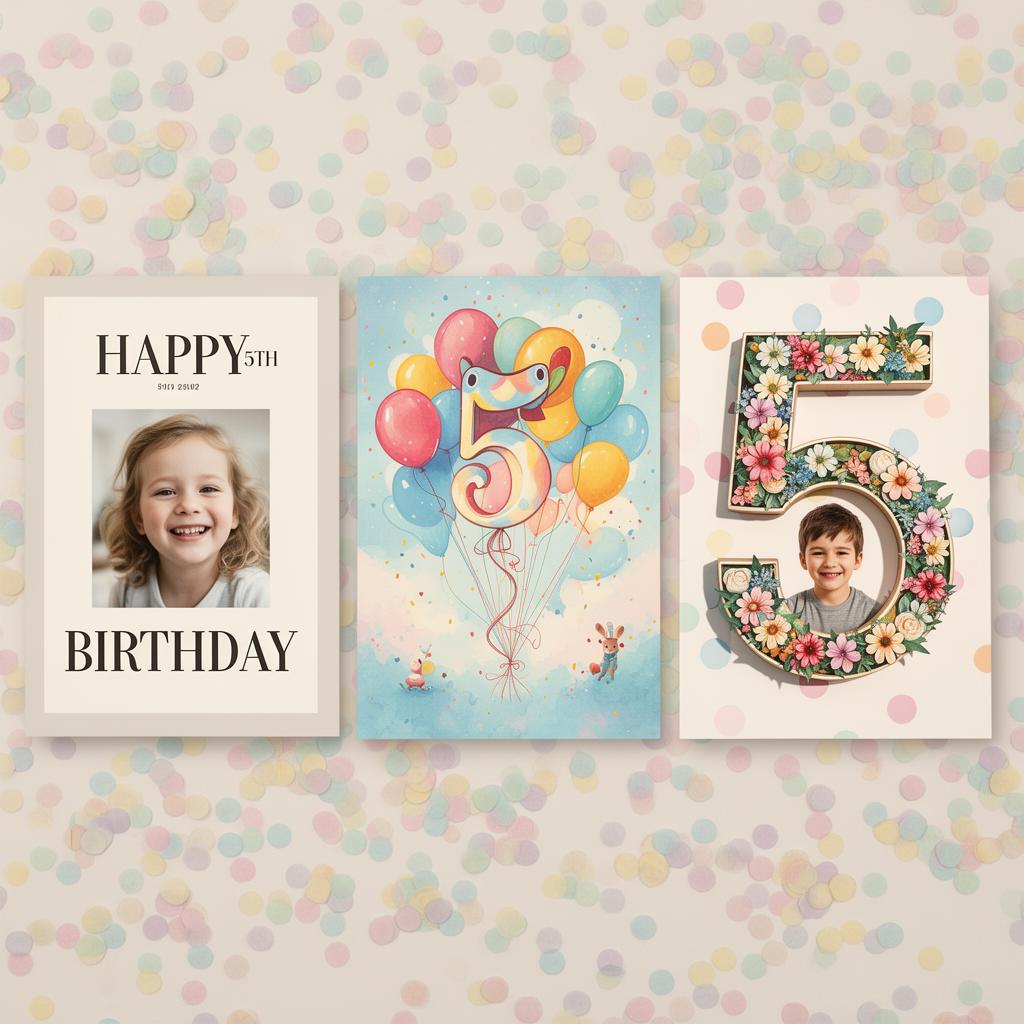
Want the party-coordinated version that comes out of the same palette as your invite and signs? Try the birthday party poster maker — free, no signup, sixty seconds.
Okay so. It is 11pm and you are searching "personalized birthday poster" because your kid is turning five in twelve days and you suddenly remembered that thing on Instagram where the poster has the kid's photo carved into a giant number filled with flowers. You don't know what it's called. You don't know who makes the good one. You just know you want it, and you want it to not look like every other one.
I went down this hole. I'll save you the rest of the hours.
There are basically three different things people are selling when they say "personalized birthday poster," and they are not the same product. Once you see the difference, you stop comparing apples to a smoothie.
The three things people actually mean
One: a photo printed on a poster-shaped piece of paper with the kid's name and a year in a nice font. Shutterfly, Mixbook, drugstore photo counters. This is what your mom calls a poster.
Two: an AI-generated image of "your kid's birthday vibe" rendered as art. Pixa, a hundred Etsy AI shops, the free generators that show up in Google ads. The poster IS the art, the photo is sometimes a reference, sometimes not used at all.
Three: a poster built around the actual party. The theme you picked, the kid's age, the kid's name, often their photo, often saved into the same dashboard where you're already tracking RSVPs and the menu. This is what Confetti does and it's where the category is going.
These three are not "good, better, best." They're for different jobs.
Option 1: Shutterfly and Canva (photo plus template)
What they're great at: printing. Shutterfly will mail you a poster that does not look like it came out of your home printer. Canva templates are free and you can drag your kid's photo into a hundred layouts in about ten minutes.
Where they fall short: the templates are made to fit any kid. Which means they kind of fit no kid. The dinosaur one has been used by 40,000 other five-year-olds this year and you can feel it. There is nothing in the template that knows your party is dinosaurs AND glow-in-the-dark AND happening at a trampoline place. It's a frame. You're the one doing the personalizing, and at 11pm you do not have personalizing energy left.
Also Canva exports a PDF. You still need to figure out where to print a 24x36. That part eats another evening if you've never done it.
When this is the right choice: you want one nice photo poster as a keepsake, you have a good high-resolution photo, and you want it shipped. Shutterfly is correct here. Use it.
Option 2: AI birthday poster generators
What they do well: novelty. A free AI generator will give you a balloons-and-confetti dreamscape in fifteen seconds and you will go "oh that's cute" and want to use it.
The honest version: the cuteness is one out of every four or five tries. The other four have the AI-tell. Six fingers. Text that says "HAPPP BIRTHDY." A kid that looks vaguely like your kid the way a stranger at the grocery store vaguely looks like your husband. And every generator with a free tier has a watermark, or limits you to one a day, or strips you to a low-resolution download you can't actually print.
The other thing nobody mentions: AI generators don't know what your party is. You type "5th birthday" and you get a generic five. You wanted dinosaurs and you have to wrestle the prompt into it. By try seven you've spent more time prompting than you would have just picking a Shutterfly template.
When this is the right choice: you want a fun digital share, not a print. Or you want to gamble on getting one really cool image to use as the invitation graphic and you have the patience for misses. (Both are real reasons.)
Option 3: party-context tools (this is the one most people end up wanting)
The thing that's missing from options 1 and 2 is the same thing: the party itself. The theme. The age. The honoree's name. The photo. The fact that you've already typed all of this into a planning tool. Why should you type it again into Canva and again into a generator?
Confetti's birthday poster tool was built around this. You're already telling the app the kid is five, the theme is space, the kid's name is Theo, here is the photo. It uses that to make a poster that's actually about Theo's space party, not a stock template, not a hallucinated kid, not a six-finger situation. Then it saves the poster to the party page so guests who scan the QR on the invitation see the same hero image, on the same page where they RSVP and check the address.
That last part is the thing. The poster is not a one-off PDF. It IS the party graphic. The invitation, the website, the printable, the share-to-grandma image, all the same poster, all generated from the same party details you entered once.
When this is the right choice: you're already planning the party in a tool. You want the poster to do double duty as the party's hero image. You want to skip the "now find a printer that prints 18x24" step (the Confetti version downloads at standard print sizes).
Quick decision guide
A list is the right shape here.
- You want one shipped, framed-quality photo print: Shutterfly.
- You want a free, infinitely customizable design and you're comfortable in Canva: Canva.
- You want a one-off art piece and you'll roll the dice: a paid AI generator (the free ones will frustrate you).
- You're planning the actual party and want the poster baked in: Confetti (or any tool in the same lane, there will be more soon).
The thing nobody warns you about: print size
I am a nurse and I am going to give you nurse advice. Print size and image resolution are the difference between "wow" and "why is my kid's face pixelated and stretched."
A 16x20 poster needs at least a 2400x3000 pixel image to print sharp. Most AI generators export at 1024x1024 unless you pay. Most phone photos are big enough but only if you started from the original, not a screenshot of the original from Instagram. Canva's free tier downloads as a PDF that's actually fine for print, but watch the bleed.
Also: hero image at the party. If the poster IS the party graphic on a website, it needs to crop cleanly to 1200x630 for the link preview when grandma texts it to her sister. Most tools don't think about this. Look for the ones that do.
So what do I actually do
If your kid's birthday is in twelve days and you want one solid keepsake to frame on the wall after the party, order from Shutterfly tonight. Done.
If you're planning the whole party, the invitation, the RSVP page, the printable, the welcome sign at the door, the photo backdrop, all of it, pick the planning tool that generates the poster as part of the same flow. You will not regret typing "Theo, 5, space party, March 14" only once.
If you're just curious and want to play with AI art for fun, go play. Just don't pay for the first generator you try and don't print a 1024x1024 image at 18x24.
What's your actual situation right now: are you trying to print one nice thing for the wall, or are you trying to make the whole party look like a party?
Try it now: Make a birthday party poster that matches the rest of the party. Free download, photo used once then gone.
Keep reading
- Birthday party poster ideas for kids — ideas by age, with what actually lands
- Printable birthday party decorations — what to print at home, what to order
- Make the poster — the live preview and the bundle
Ready to actually plan it?
Pip turns this into your real party plan in about a minute. Free to start.
Start planning →